
Best 10-Minute Workflow Tools for Faster Productivity (2026 Guide)
By [Aswin] — I test and simplify productivity systems for bloggers, freelancers, and remote workers. I’ve spent the last two years building lean workflows that actually stick, and this site is where I share what works.
Let me be real with you. Most productivity advice online assumes you have a free weekend to completely redesign how you work. You don’t. And honestly, you shouldn’t have to.
What actually moves the needle are 10-minute workflow tools — apps and techniques you can set up in a single sitting and then benefit from every single day. I’ve personally tested every tool on this list. Some of them changed how I work in ways I didn’t expect. A few surprised me completely.
This guide cuts through the noise. No fluff, no tools that take three days to configure. Just the best fast productivity tools that are genuinely worth your time in 2026.
Who This Is For
Before we dive in, let me be clear about who this guide is written for. You’ll get the most out of this if you’re a blogger or content creator who needs to write faster without a team behind you, a freelancer juggling multiple clients and tired of wasting time on admin work, a remote worker dealing with too many tools and not enough focus, or anyone who feels constantly busy but can’t quite point to what’s actually getting done.
If any of those sound like you, keep reading.
What Are 10-Minute Workflow Tools?
A 10-minute workflow tool is any app, browser extension, or automation that you can learn, set up, and start using in ten minutes or less — and that keeps saving you time long after that first session.
Think of it like this. Some tools are like flat-pack furniture. You spend a whole Sunday assembling them, and maybe they’re great, but the effort upfront is steep. A 10-minute workflow tool is more like a shelf that’s already on the wall. You just put your stuff on it and get back to work.
These tools fall into a few clear categories: text expanders, calendar tools, task automation, AI writing assistants, time trackers, focus timers, and async communication tools. We’ll cover all of them.
Why Fast Setup Actually Matters
Here’s something most productivity writers skip: a tool you never finish setting up is a tool that doesn’t exist.
Most people download a productivity app, open it once, get overwhelmed by the settings, and never touch it again. The barrier isn’t motivation. It’s friction. When something takes ten minutes instead of two hours, you actually do it. And when you actually do it, things change.
Research from Atlassian found that the average worker spends roughly 31 hours a month in unproductive meetings. The American Psychological Association has noted that task-switching can reduce productivity by as much as 40%. These aren’t small numbers. They’re hours of your life every single week.
The best 10-minute workflow tools don’t fix everything overnight. But they chip away at the friction and interruptions that quietly eat your most valuable time.
Quick Comparison: All 10 Tools at a Glance
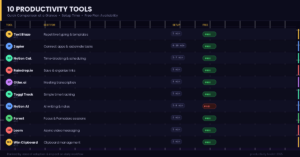
Text Blaze — Best for repetitive typing and email templates — Setup: 5 minutes — Free plan: Yes
Zapier — Best for connecting apps and automating tasks — Setup: 8 to 10 minutes — Free plan: Yes, with limits
Notion Calendar — Best for time-blocking and scheduling — Setup: 5 to 7 minutes — Free plan: Yes
Raindrop.io — Best for saving and organizing links — Setup: 5 minutes — Free plan: Yes
Otter.ai — Best for automatic meeting transcription — Setup: 3 minutes — Free plan: Yes
Toggl Track — Best for simple time tracking — Setup: 5 minutes — Free plan: Yes
Notion AI — Best for AI-assisted writing and notes — Setup: 5 to 8 minutes — Free plan: Paid add-on
Forest — Best for focus sessions and Pomodoro — Setup: 2 minutes — Free plan: Basic version
Loom — Best for async video instead of meetings — Setup: 5 minutes — Free plan: Yes
Windows Clipboard History — Best for clipboard management — Setup: 2 minutes — Free plan: Built-in
The Best 10-Minute Workflow Tools to Use in 2026
1. Text Blaze — The Fastest Simple Workflow Tool for Writers
Setup time: 5 minutes
If you type the same things over and over — your email sign-off, a reply to a common client question, your bio, an invoice note — a text expander is going to feel like a small miracle.
Text Blaze lets you create shortcuts like /intro that instantly expand into a full paragraph you’ve written in advance. 10-Minute Workflow Tools
You write the text once, assign a shortcut, and you’re done. Every time you need it, you type three characters instead of three hundred.
I’ve personally used Text Blaze for about three months now, and it cut the time I spend on repeat emails by roughly 40 percent. That sounds modest until you realize those emails were eating 20 to 30 minutes every single day. Multiply that across a week and you’ve got real hours back.
2. Zapier — Automate Fast with This Best 10-Minute Workflow Tool
Setup time: 8 to 10 minutes
You do not need to know how to code to automate your work. Zapier connects thousands of apps together and their beginner templates make it possible to build your first automation in one lunch break.
A practical example: every time a new client fills out your contact form, Zapier automatically adds them to your spreadsheet, sends them a welcome email, and creates a task in your project manager. 10-Minute Workflow Tools
That chain of actions used to take manual effort every single time. Now it just happens.
I built my first automation — connecting a Google Form to a Notion database — in about eight minutes. It still runs every time someone submits that form without me doing a single thing. Zapier’s own research suggests workers who use automation save one and a half to two hours per day on repetitive tasks alone.
3. Notion Calendar — Smart Scheduling in Under 10 Minutes
Setup time: 5 to 7 minutes
Most people manage their calendar passively. They look at what’s already there, react to it, and call that planning. That’s not a system. That’s just showing up.
Notion Calendar connects all your calendars into one clean view and makes time-blocking genuinely easy. You drag tasks directly onto your schedule as time blocks, so your day has a real shape instead of just a list of intentions.
It took me about six minutes to connect my Google Calendar and start blocking my morning writing time. The first week I used it consistently, I noticed I was getting more done before noon than I used to get done all day. 10-Minute Workflow Tools
The difference was that I had actually decided in advance where the work would happen.
4. Raindrop.io — Organize Your Links with This Fast Productivity Tool
Setup time: 5 minutes
Browser bookmarks are where good links go to die. If your bookmark bar looks like a pile of unsorted receipts, Raindrop.io is the fix.
It’s a visual bookmark manager. You save a link, and it pulls in the title, a preview image, and lets you tag it and sort it into named collections. The search is instant. Finding something you saved three weeks ago takes ten seconds instead of five minutes of frustrated clicking.
Install the browser extension, spend five minutes creating two or three collections — Research, Tools, Read Later — and you’re done. Everything after that flows in automatically as you browse.
5. Otter.ai — Stop Taking Meeting Notes Manually
Setup time: 3 minutes
If you sit in regular meetings and try to take notes at the same time, you already know the problem. You’re either fully present in the conversation or you’re fully writing. You can’t really do both at once.
Otter.ai connects to Zoom or Google Meet and transcribes your meeting in real time. After the call, you get a searchable transcript with a summary and the key action items already pulled out. You can share it with your team and search back through it whenever you need to.
I started using Otter.ai for client calls about four months ago. The amount of mental energy I stopped spending on trying to simultaneously listen and write was immediately noticeable. My clients also appreciated getting a clean summary after each call without me having to write one up.
6. Toggl Track — The Simple Time Tracking Tool That Changes How You See Your Day
Setup time: 5 minutes
Most people feel busy. Very few people actually know where their time goes. Toggl Track fixes that.
You click Start when you begin a task, click Stop when you finish. After a week, you get a visual breakdown of how your hours were actually spent. The first time most people see their Toggl report, they are genuinely surprised. Often not in a comfortable way.
When I started tracking with Toggl, I found I was spending over two hours a day on email and admin tasks that each felt like five minutes in the moment. Seeing it laid out in a weekly chart made it real in a way that just suspecting it never did. 10-Minute Workflow Tools
That one insight changed how I structured my mornings completely.
7. Notion AI — AI Writing Inside Your Actual Workflow
Setup time: 5 to 8 minutes
If writing is part of your work — blog posts, client proposals, meeting notes, social captions — Notion AI removes the hardest part: getting started.
You open a Notion page, type a rough idea or a messy set of bullet points, and ask Notion AI to turn it into a first draft. Or you paste something you’ve already written and ask it to tighten it up. It’s not about letting AI do your thinking for you. It’s about cutting the time between “I need to write something” and “I have a starting point to react to.”
Notion is already one of the most widely used tools among creators and remote teams — over 30 million people use it — and the AI layer integrates so smoothly into the writing process that it doesn’t feel like switching tools at all.
8. Forest — A Pomodoro Timer That Actually Makes You Follow Through
Setup time: 2 minutes
This one is almost too simple to include, but I’d be doing you a disservice if I left it out. It genuinely works.
Forest uses the Pomodoro method — 25 minutes of focused work, 5-minute break, repeat — and adds a small gamification layer. While you work, a virtual tree grows in the app. If you leave the app to check social media, the tree dies. It sounds ridiculous. It is also remarkably effective.
The guilt of killing a tree is weirdly strong. Most people who try Forest for a week end up using it for months. It’s one of those tools where the mechanism shouldn’t work but somehow does.
9. Loom — Replace Meetings with 2-Minute Videos
Setup time: 5 minutes
Some information doesn’t need a meeting. It needs a two-minute video.
Loom lets you record your screen with a small face-cam in the corner and share the result as a link instantly. Instead of scheduling a 30-minute call to walk a client through feedback or explain a process, you record it in two minutes and send the link. They watch it when it suits them, leave time-stamped comments if they have questions, and you’ve saved everyone the effort of coordinating schedules.
I use Loom for almost all client feedback now. The response rate is higher than email, the back-and-forth is dramatically shorter, and nobody has to block out a time slot in advance.
10. Windows Clipboard History — The Built-In Tool Most People Have Never Used
Setup time: 2 minutes
This one requires zero downloads. If you’re on Windows, press Win + V right now. If it isn’t already enabled, it will prompt you to turn it on. Do it immediately. 10-Minute Workflow Tools
Clipboard History saves the last 25 items you’ve copied — text, links, snippets, anything — and lets you paste any of them with a simple shortcut. No more copying something new and losing what you had before. No more switching between two documents just to move a few pieces of text around.
Mac users can get the same thing from Alfred, which is free. Either way, setup is under three minutes and the benefit starts the same day.
My Actual 10-Minute Workflow Stack
People ask me what I genuinely use day to day, so here it is. This isn’t a list of tools I’ve heard are good. This is what’s actually running in the background while I work.
Text Blaze handles all my email templates, standard client replies, and blog formatting shortcuts. Notion Calendar gets blocked every morning for writing time before anything else touches my schedule.
- 10-Minute Workflow Tools
Toggl Track runs in the background any time I’m working and I review the weekly report every Friday. Otter.ai is on automatically for every client call. Loom replaces about 70 percent of the meetings I would otherwise have had. Windows Clipboard History runs constantly and I use it dozens of times a day without thinking about it.
I didn’t set all of these up at once. I added one every week or two, let it become a natural habit, and then brought in the next one. That pacing matters. Trying to adopt ten new tools in a single day is how you end up using zero of them a month later. 10-Minute Workflow Tools
Tips for Getting the Most Out of These Tools
Start with your biggest daily frustration, not the most impressive-sounding tool. If email is killing your mornings, start with Text Blaze. If meetings are the problem, start with Otter.ai or Loom. The best tool is always the one that solves the specific thing that’s actually slowing you down right now.
Pair tools that work well together. Toggl and Forest complement each other naturally — you track time while working in focused blocks, and the data reinforces the habit. Loom and Otter.ai work together for async communication. 10-Minute Workflow Tools
Think about which tools solve adjacent problems in your day.
Put setup time on your calendar like a real meeting. The biggest reason people never start is they wait for a free moment that never arrives. Block ten minutes, protect it, and actually use it.
Revisit your tools every few months. Apps improve. Something that felt clunky six months ago may have shipped the exact feature you needed. Check in occasionally and cut what isn’t earning its place.
Common Mistakes to Avoid
Downloading tools you never actually use is not a productivity system. It’s digital clutter with a subscription fee. If you’re not using something within the first week or two, delete it and try something else.
Skipping automation is a common one. Most people use these tools manually when a single Zapier connection could handle the repetitive part automatically. Always ask yourself whether a task you’re doing repeatedly could be automated. Usually the answer is yes.
Expecting instant results sets you up for disappointment. A text expander on day one saves you thirty seconds. After six months of consistent use, it’s saved you several full hours. These tools compound quietly. 10-Minute Workflow Tools
The value grows the longer you actually use them.
Switching tools too often undermines everything. There’s always a new productivity app launching somewhere. The urge to try the latest thing is real, but constantly switching means you never get the compounding benefit of staying with anything. Give each tool at least three to four weeks before you make a judgment call.
Conclusion
Productivity doesn’t have to be a project. It just has to be a habit.
Every tool on this list takes under ten minutes to set up. Most of them will start returning that time to you within the first few days. The goal isn’t to build a perfect system from scratch. It’s to remove the specific friction that’s quietly draining your energy and focus right now.
Pick one tool from this list — the one that speaks to your biggest daily frustration. Set it up today. It won’t take long. Then come back in a week and add one more.
Small improvements, made consistently, add up to something you’ll genuinely notice over time. That’s how this works. Not all at once, but steadily.
Start simple. Start today.